Your clipboard,
supercharged.
The supercharged clipboard you actually want to use. Everything you copy is kept: text, links, code and images. Search it, browse it, paste it back at the cursor in one keystroke.
Everything you need.
Nothing you don't.
Designed for speed and clarity. CopyStr stays out of your way until you need it.
Clipboard History
Every copy saved automatically, newest on top, the whole history one scroll away. Set how many clips to keep; pinned ones always stay.
Quick Search
Find anything you've copied with instant fuzzy search.
Reuse Anything
One click to paste any previous copy into any app.
Minimal UI
A clean popup at your cursor. CopyStr lives in the menu bar only: no Dock icon, no app switcher entry.
Images and screenshots
A screenshot lands in history with a thumbnail and its size, and pastes back as a picture. One switch keeps images out entirely.
Paste slots
Cmd+Shift+1, 2 and 3 paste the three most recent clips straight at the cursor, without opening the window.
Private mode
Switch recording off from the menu bar. Nothing is written while it is on, and the icon says so at a glance.
Pin it and move it
Pin the window so it stays open while you work, then drag it anywhere by the grip next to the search field.
English and Russian
The whole interface, menu bar included, follows your system language or whichever you pick in Settings.
Your mark in the menu bar
Ten purpose-drawn icons to choose from, so CopyStr sits in your menu bar the way you want it.
Snippet folders
Right-click a clip to file it in a folder. Folders sit under the history; hover one to see its snippets and click to paste. Export them to JSON and import them back.
Sensitive clips
Mark a clip sensitive and it shows only its first and last characters, in history and in folders. The eye reveals it until the popup closes.
Three steps to clipboard zen.
Copy anything
Copy text, links, code, anywhere on your Mac. CopyStr captures it silently.
Press the hotkey
Hit your shortcut to open CopyStr right where your cursor is. No context switching.
Pick and paste
Browse or search your history, click to paste. Done in under a second.
Looks good. Works better.
Real screenshots, not mockups. A polished UI that feels native on macOS, in any theme.
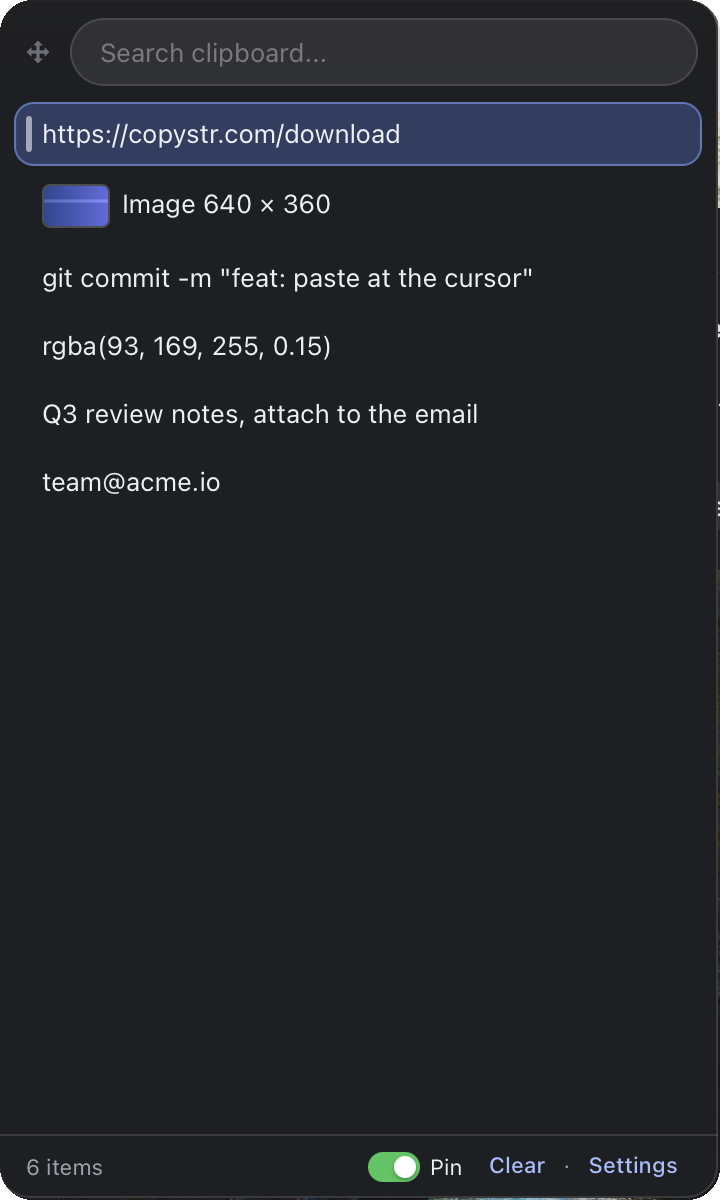 History with text, links and images
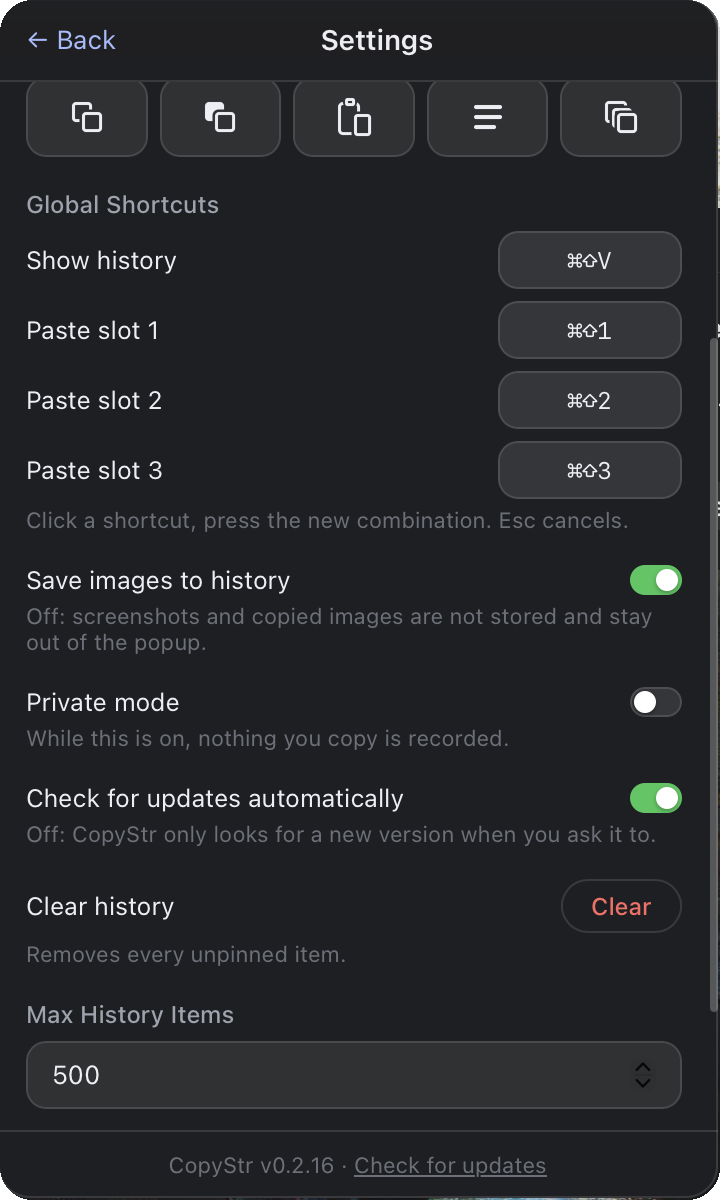 Everything in one Settings page
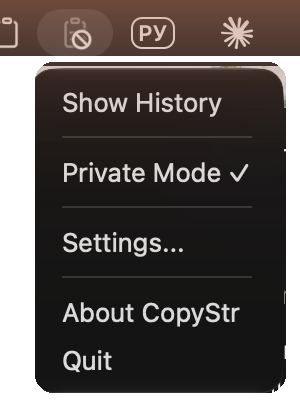 In the menu bar, private mode on
What you copy stays yours.
History lives in a local SQLite database on your Mac. There is no account, no sync and no server: CopyStr goes online only to check for a new version, and offline mode switches even that off.
Private mode on: the icon fades and takes a no sign
Private mode, one click away
Turn it on from the menu bar or from Settings and CopyStr stops recording: nothing you copy is added to history until you turn it back off. The menu bar icon shows the state without opening anything, and the choice survives a restart.
Passwords and keys are skipped
Passwords copied from 1Password, Bitwarden, KeePassXC or Apple Passwords never reach history: these apps mark every password they copy, and CopyStr honours the mark. Content in common secret formats, such as API keys, tokens, private keys and card numbers, is left out too. A password copied from anywhere else, say a note, looks like ordinary text, so turn on private mode for those.
Images only if you want them
One switch in Settings keeps screenshots and copied pictures out of history, and hides the ones already there.
Clear it whenever
Delete a single clip from its right-click menu, or clear the whole history from the popup or from Settings. Pinned items stay, everything else is removed from history.
Follow one copy through CopyStr.
Every step below runs on your Mac. This is exactly what the app does with what you copy, and the one time it goes online.
-
You copy
Cmd+C in any app. macOS puts it on the system clipboard, the same as without CopyStr.
NSPasteboard -
CopyStr notices the change
Twice a second it checks the clipboard's change counter. Only when the counter moves does it read the new text, image or file list, and the name of the app in front. Empty copies and repeats are dropped.
changeCountevery 500 ms -
Privacy filter
Runs before anything is saved.
The copy is skipped when:
- private mode is on;
-
the app that copied it marked it as concealed or temporary, as password managers do with every password (
org.nspasteboard.ConcealedType). CopyStr does not even read such a copy; -
the text matches a known secret format: API keys and tokens (
sk-,ghp_, AWS, JWT, Bearer), private key blocks,password=lines, database URLs with a password, card numbers, one-time codes; - it is an image and "Save images to history" is off;
-
it comes from an app on your exclusion list (
excluded_appsin config.toml; 1Password, Bitwarden, KeePassXC, Keychain Access and Passwords are on it by default).
A skipped copy is never written to disk. Format detection works by pattern, so a password copied from an app that does not mark it, say a note or a chat, looks like ordinary text. Turn on private mode for those.
-
Saved to a local database
A plain SQLite file in your user Library. It keeps the newest 500 clips by default ("Max History Items" in Settings), and with "Keep history" it can also drop clips older than 1 to 90 days; pinned and starred clips stay. Clips you hid behind asterisks can be set to delete themselves 5 minutes, an hour or a day after they were last copied or pasted.
~/Library/Application Support/ copystr/ copystr.db -
Search and paste back
Search runs over that file, on your Mac. When you pick a clip, CopyStr puts it back on the clipboard and presses Cmd+V for you in the app you were using (this needs Accessibility permission).
Update checker
The only part of CopyStr that uses the network, and it never touches your history. It runs 5 seconds after launch (switch off "Check for updates automatically" to stop that) and when you click "Check for updates". Offline mode switches it off completely.
/update/latest.jsonsame address for everyone, no ID, no app version
No CopyStr cloud
The app has no account server, no sync server, no analytics and no crash reporting. There is nowhere for your clips to go.copystr.com
Serves one small JSON file and the update package, through Cloudflare. Like any website, it sees your IP address and the time of the check.What stays on your Mac
- Your clips, with the app each came from and when.
-
History:
~/Library/, an SQLite file with itsApplication Support/ copystr/ copystr.db -waland-shmcompanions. -
Settings:
~/Library/, a plain text file.Preferences/ copystr/ config.toml - CopyStr does not encrypt the database itself. It is protected like your other files: by your macOS account and FileVault.
-
To remove it: clear the history in Settings, or quit CopyStr and delete the
copystrfolder.
The only network request
-
What: HTTPS GET
https://copystr.com/update/ latest.json - When: 5 seconds after launch, and when you click "Check for updates". The automatic check can be turned off in Settings, and offline mode turns off both: then CopyStr makes no connections at all.
- Sent: only the request, with a generic updater User-Agent. No clips, no history, no settings, no device ID, not even your app version. Like any connection, it reveals your IP address.
- Received: the latest version number, a download link and a signature.
- Installed: only after you click Install, and only if the package's signature matches the public key built into CopyStr (minisign, Ed25519). A package that fails the check is rejected.
What the app never does
- Ask for an account or a sign-in.
- Collect analytics, telemetry or crash reports: there is no such code in the app.
- Sync or back up your history to a server.
- Touch the network when you copy, search or paste.
- Load its interface from the web: every screen is bundled inside the app.
Verify it yourself
You don't have to take our word for it. Paste these into Terminal.
Watch its network traffic
nettop -p copystrlsof -i -n -P -a -c copystr
The app's process is called copystr. nettop shows its connections live, lsof lists the ones open right now. Outside an update check, both stay empty.
Look at your own data
ls -la ~/Library/Application\ Support/copystr/sqlite3 -readonly ~/Library/Application\ Support/copystr/copystr.db "SELECT COUNT(*) FROM clipboard_items;"
Your whole history is that one file, readable with the sqlite3 tool that ships with macOS.
Read the update reply
curl -s https://copystr.com/update/latest.jsonThe same file the update check downloads: a version number, a link and a signature. Nothing about you.
Check the app's signature
codesign --verify --strict --verbose=2 /Applications/CopyStr.appcodesign -dv --verbose=4 /Applications/CopyStr.app
Expect "valid on disk": nothing in the app was changed after it was signed. The second command shows Authority=CopyStr Release Signing, our own release certificate. It is not an Apple Developer ID, so spctl reports the app as not notarized.
Or use a firewall app
LuLu (free and open source) or Little Snitch will show the update check to copystr.com as CopyStr's only connection. Block it and everything else keeps working; only updates stop.
Questions, answered.
Is CopyStr free?
Yes. CopyStr is a free download and works without an account or subscription.
Which Macs does it run on?
macOS 13 Ventura or later on Apple Silicon. The app is a small native binary built with Rust and Tauri.
Does my clipboard leave my Mac?
No. History is stored in a local SQLite database on your Mac. CopyStr only goes online to check copystr.com for a new version.
What does private mode do?
It stops recording. While it is on, nothing you copy is added to history, and the menu bar icon shows it. What was saved before stays where it is, and the mode survives a restart.
How do I open the clipboard history?
Press the global hotkey, Cmd+Shift+V by default, and the history opens at your cursor. You can also click the menu bar icon or set your own shortcut in Settings.
What about passwords and API keys?
Passwords copied from a password manager are never stored: 1Password, Bitwarden, KeePassXC and Apple Passwords mark them, and CopyStr honours the mark. Tokens, API keys and private keys are recognised by their format and skipped as well. For a password copied from anywhere else, use private mode, which suppresses recording entirely while it is on.
How do snippets work?
Right-click any clip, choose Add to snippets and pick or create a folder. Each snippet is a full copy, so it outlives history cleanup. Folders can be renamed, deleted, exported to a JSON file and imported on another Mac.
Why does it ask for Accessibility access?
To paste a picked clip, CopyStr presses Cmd+V for you, and macOS allows that only with Accessibility access. Releases are signed with one certificate, so the grant survives updates. Without it the clip is still copied and CopyStr tells you how to fix it.
How do updates work?
CopyStr checks copystr.com on launch and from the menu bar, then installs signed updates in place, so you keep your history and settings.
Ready to upgrade your clipboard?
Join thousands of developers, designers, and writers who never lose a copy again.
Download for macOS Free download · No account required